Microsoft 365 (formerly Office 365) is often one of the largest software line items in an enterprise IT budget. Licenses are billed per user, every month or every year, and they are easy to over-buy: inactive accounts keep their licenses, power-user plans go to people who only need email, and add-ons pile up across departments.
With Microsoft’s price increase in July 2026, that waste costs more than ever. This guide covers the main Microsoft 365 plans, where license spend leaks, and a repeatable process to keep it under control.
Microsoft 365 plans and prices
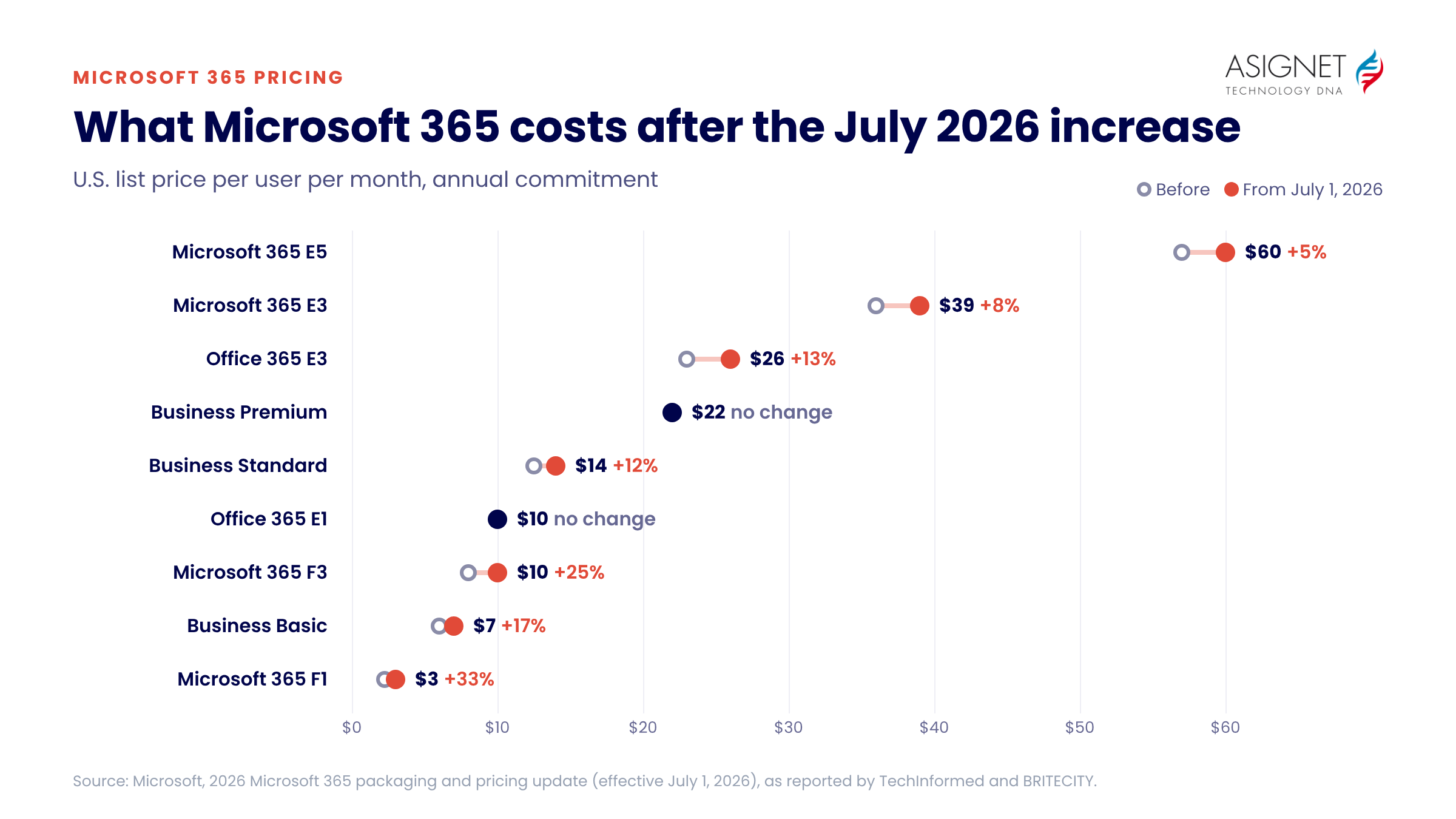
Microsoft raised prices on most commercial Microsoft 365 and Office 365 suites on July 1, 2026. New customers pay the new prices immediately. Existing customers pay them at their first renewal after that date.
| Plan | Best for | Before July 2026 | From July 1, 2026 | Change |
|---|---|---|---|---|
| Microsoft 365 F1 | Frontline workers who need Teams and web access only | $2.25 | $3.00 | +33% |
| Microsoft 365 F3 | Frontline workers who need web and mobile Office apps | $8.00 | $10.00 | +25% |
| Microsoft 365 Business Basic | Small businesses (up to 300 users) needing email, Teams and web apps | $6.00 | $7.00 | +17% |
| Microsoft 365 Business Standard | Small businesses that need desktop Office apps | $12.50 | $14.00 | +12% |
| Microsoft 365 Business Premium | Small businesses that need advanced security and device management | $22.00 | $22.00 | No change |
| Office 365 E1 | Enterprise users who work in web apps only | $10.00 | $10.00 | No change |
| Office 365 E3 | Enterprise users who need desktop apps and compliance tools | $23.00 | $26.00 | +13% |
| Microsoft 365 E3 | Enterprise users who need Office, Windows Enterprise and device management | $36.00 | $39.00 | +8% |
| Microsoft 365 E5 | Users who need advanced security, compliance, analytics and phone system | $57.00 | $60.00 | +5% |
U.S. list prices per user per month with an annual commitment. Enterprise suites are also sold without Teams at a lower price, with Teams licensed separately. Monthly billing costs about 20% more. Microsoft 365 Copilot is a separate add-on at $30 per user per month. Prices as of October 2026; check Microsoft’s pricing pages before you buy.
Which license does each user need?
The biggest savings usually come from matching the plan to how each person works, rather than giving everyone the same license.
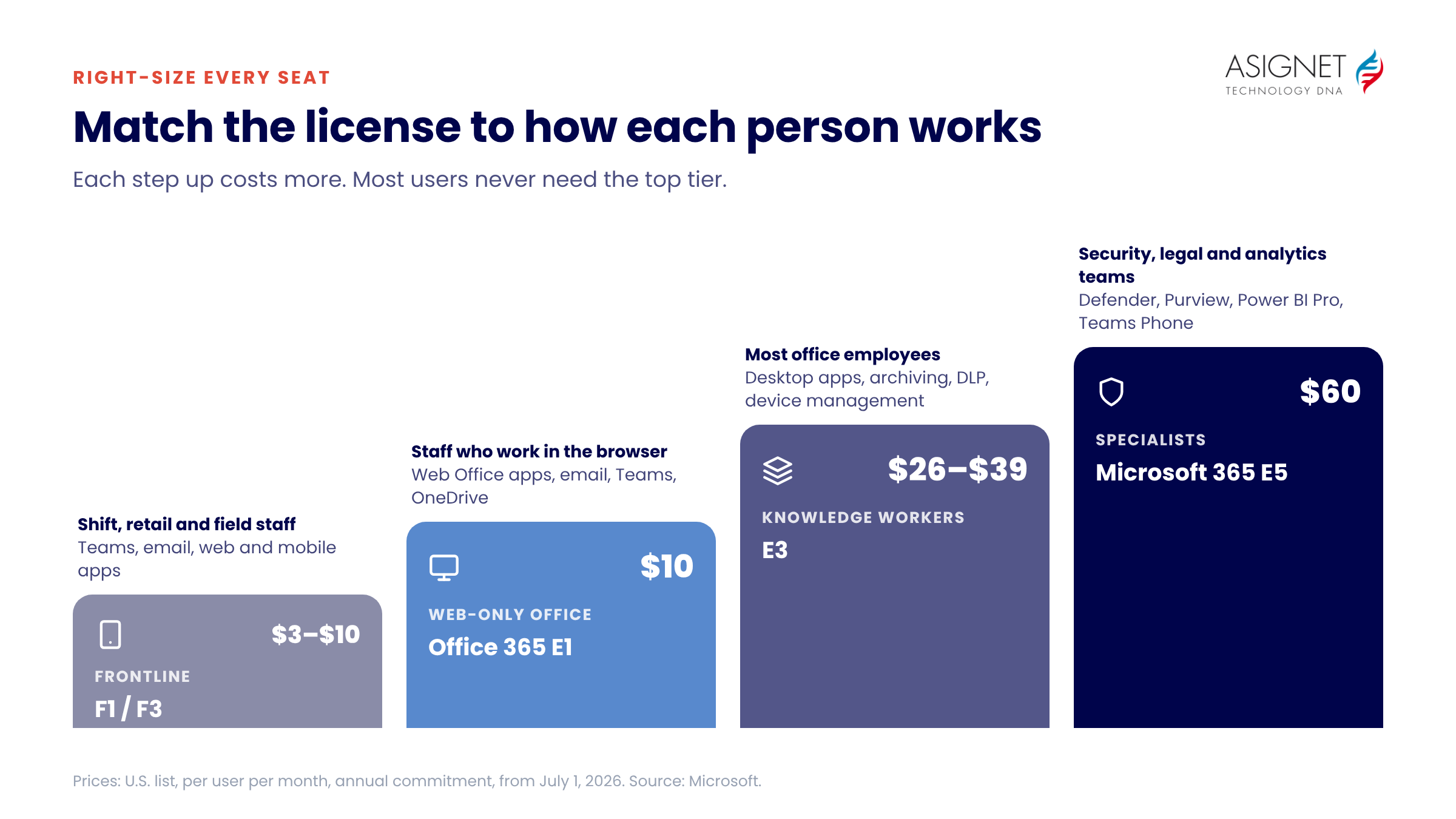
- Frontline plans (F1, F3) suit shift workers, retail and field staff who mainly use Teams, email and mobile apps.
- Office 365 E1 suits office workers who can do everything in Outlook, Word and Excel on the web.
- Office 365 E3 or Microsoft 365 E3 suits knowledge workers who need desktop apps, larger mailboxes, archiving and data loss prevention. Microsoft 365 E3 adds Windows Enterprise and Intune device management.
- Microsoft 365 E5 adds Defender for advanced threat protection, Purview for advanced compliance and eDiscovery, Power BI Pro and Teams Phone. It is worth it for security, legal and analytics teams, but it is often assigned far more widely than needed.
Many organizations mix plans: for example, E5 for security and compliance staff, E3 for most office workers and F3 for frontline teams.
Where Microsoft 365 license costs leak
- Inactive users. Licenses stay assigned to people who left, changed roles or haven’t signed in for months.
- Over-licensing. Users have E5 when E3 covers what they use, or E3 when E1 or F3 would do.
- Duplicate add-ons. Users pay for standalone add-ons (such as Visio, Project or Power BI Pro) that are already in their suite.
- Shadow purchases. Teams buy subscriptions on corporate cards instead of using licenses the company already owns.
- Unplanned renewals. Seat counts roll over at renewal without a review, and since July 2026, at higher prices.
- Copilot sprawl. Copilot seats at $30 per user per month go to people who rarely use them.
How to manage Microsoft 365 license costs
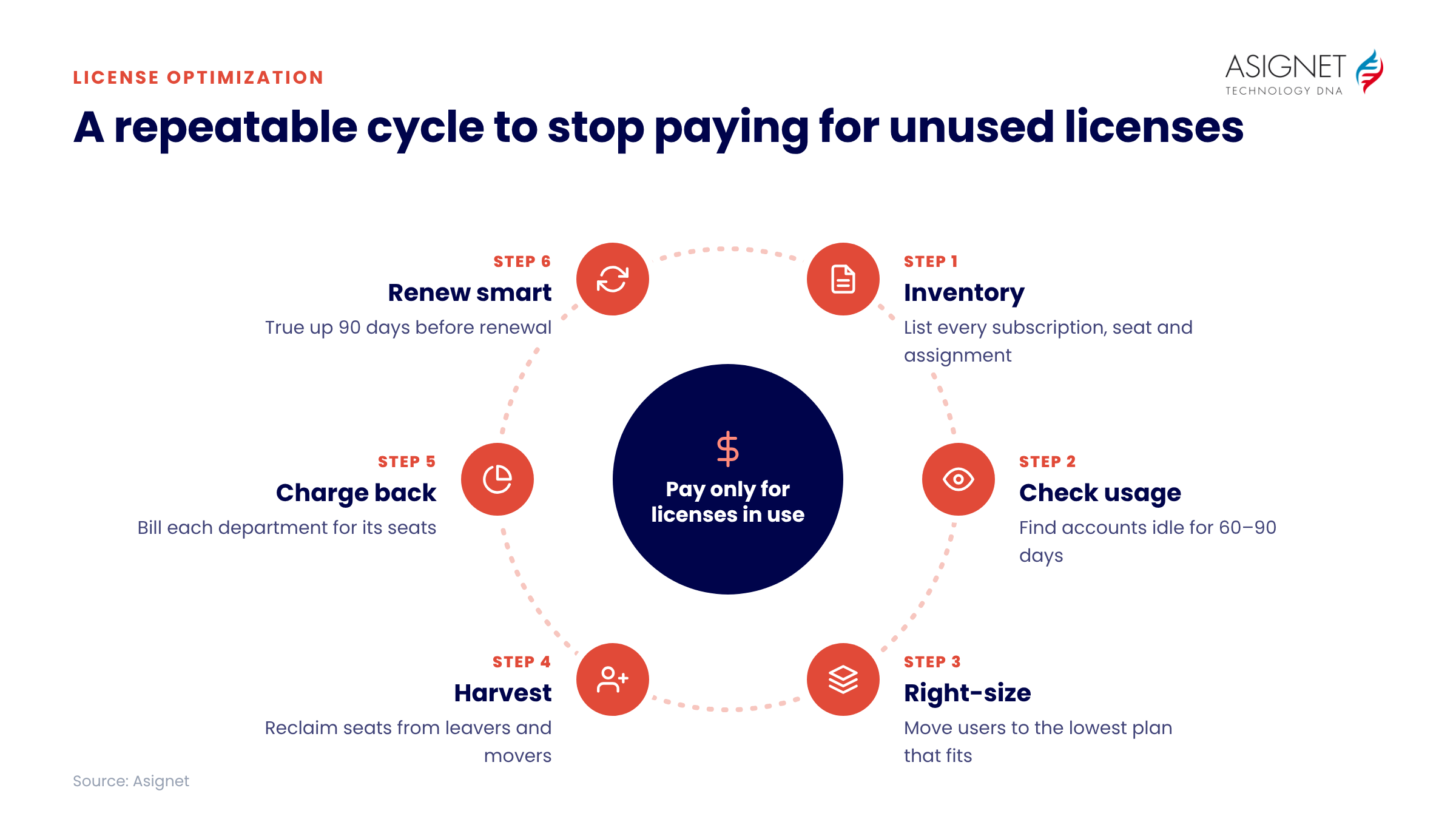
- Build a complete license inventory. List every subscription, how many seats you own and how many are assigned, across all tenants and purchase channels.
- Check real usage. Use Microsoft 365 usage reports to find accounts with no sign-ins, mailbox activity or app usage in the last 60 to 90 days.
- Right-size each user. Move users to the lowest plan that covers what they actually use, and remove add-ons already included in their suite.
- Harvest licenses with joiner, mover and leaver processes. Remove licenses the day someone leaves and reassign them to new hires before buying more.
- Allocate costs with chargebacks. Charge each department for the licenses it uses, so managers see the cost of every seat.
- Plan renewals early. Start 90 days before your renewal date to true up seat counts, compare plans and negotiate.
Managing chargebacks for Microsoft 365
Cloud licenses make chargebacks harder than old-style software purchases. Charges arrive monthly, users change departments, and large organizations spread licenses across many locations and cost centers. Without accurate license data, IT ends up splitting the bill evenly, so departments have no reason to give up unused seats.
Accurate chargebacks need a current view of who holds which license, which cost center they belong to and whether they use it. That view also shows where a cheaper license can replace an expensive one without losing features the user needs.
How Asignet helps you control Microsoft 365 license costs
- Full license visibility. See every Microsoft 365 subscription, seat and assignment across tenants, departments and locations.
- Usage-based recommendations. Identify inactive and underused licenses, and get upgrade and downgrade reports showing the most cost-effective plan for each user.
- License harvesting. Reclaim licenses through joiner, mover and leaver workflows, and see spare licenses before anyone buys new ones.
- Accurate chargebacks. Allocate license costs to the right department or cost center automatically.
- Better negotiations. Go into Microsoft renewals with accurate seat counts and usage data.
Contact Asignet to find out how much you could save on Microsoft 365 licenses.
Frequently asked questions
Is Office 365 the same as Microsoft 365?
Mostly. Microsoft renamed most Office 365 plans to Microsoft 365 in 2020. The Office 365 E1, E3 and E5 enterprise plans still exist alongside Microsoft 365 E3 and E5, which add Windows Enterprise and device management.
How much did Microsoft 365 prices go up in 2026?
From July 1, 2026, most plans rose between 5% and 33%. Frontline plans saw the largest increases. Business Premium and Office 365 E1 did not change.
How do I find unused Microsoft 365 licenses?
Compare assigned licenses with sign-in and activity data from Microsoft 365 usage reports. Accounts with no activity for 60 to 90 days are the first candidates to remove or reassign.
What is the difference between Microsoft 365 E3 and E5?
E5 adds advanced security (Microsoft Defender), advanced compliance and eDiscovery (Microsoft Purview), Power BI Pro and Teams Phone. Most users don’t need these features, so many organizations give E5 only to specific teams.
Can I mix Microsoft 365 plans in one organization?
Yes. You can assign different plans to different users in the same tenant, within each plan’s limits. For example, Business plans are capped at 300 users.