
The main difference between Microsoft Teams and Zoom is scope. Microsoft Teams is included in Microsoft 365 business plans, so for a similar per-user price you also get chat, email, Office apps and file storage. Zoom is best known for simple, reliable video meetings, and has grown into a broader platform called Zoom Workplace.
Video conferencing is a core part of how businesses work, and choosing the right platform matters. In this article, we compare Microsoft Teams and Zoom on pricing and capacity, user interface, features, meeting rooms, integrations, security and support.
What Is Microsoft Teams?
Microsoft Teams is a collaboration platform that lets businesses chat, meet, call and work together in real time. It is tightly integrated with the rest of Microsoft 365, including Word, PowerPoint, Excel, SharePoint and OneDrive, which makes it a true collaboration hub rather than just a meeting tool.
Launched in 2017 to compete with Slack, Teams grew rapidly during the shift to remote work and is now one of the most widely used workplace collaboration tools in the world.
What Is Zoom?
Zoom gives businesses an easy way for people in different locations to meet by video. Beyond meetings, its Zoom Workplace platform now includes team chat, webinars, a cloud phone system, whiteboards and AI Companion features, and it integrates with hundreds of apps, including Microsoft Teams, Slack, Salesforce and Google Workspace.
Zoom was founded in 2011 and saw explosive growth in 2020, when daily meeting participants jumped from about 10 million in December 2019 to more than 300 million in April 2020.
Microsoft Teams vs. Zoom: Pricing and Capacity
Both platforms have free and paid plans.
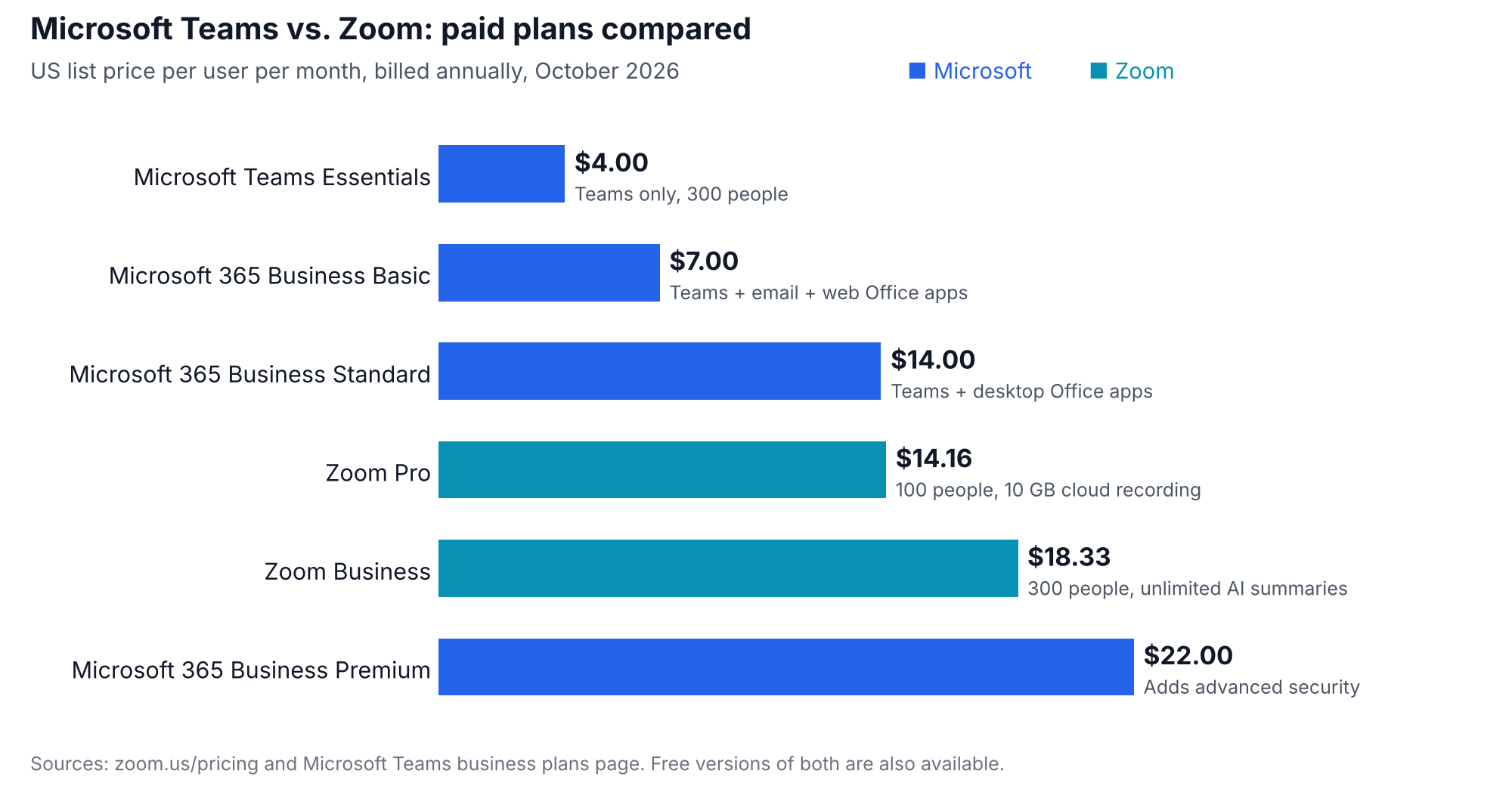
Microsoft Teams has a free version that supports group meetings of up to 60 minutes with up to 100 participants. Paid plans, billed annually, include:
- Microsoft Teams Essentials: $4 per user per month, meetings of up to 300 people and 30 hours
- Microsoft 365 Business Basic: $7 per user per month, adding business email and web versions of the Office apps
- Microsoft 365 Business Standard: $14 per user per month, adding desktop Office apps
- Microsoft 365 Business Premium: $22 per user per month, adding advanced security
Zoom has a free Basic plan that supports up to 100 participants, with group meetings limited to 40 minutes. Paid plans, billed annually, include:
- Zoom Pro: $14.16 per user per month ($16.99 billed monthly), up to 100 participants, 30-hour meetings and 10 GB of cloud recording
- Zoom Business: $18.33 per user per month ($21.99 billed monthly), up to 300 participants
- Zoom Enterprise: contact sales, with larger meetings and unlimited cloud recording
Prices are US list prices as of October 2026. Check Zoom and Microsoft for the latest.
Microsoft Teams vs. Zoom: User Interface
When it comes to its user interface, Microsoft Teams’ greatest strength is also its greatest weakness. Teams pulls video conferencing, chat and many other Microsoft 365 productivity and collaboration features into one place.
With so many features in one place, however, Teams can be difficult for first-time users to navigate and can even feel overwhelming. If Teams is at the top of your list, it is wise for managers to get familiar with it before training employees, so they can lead by example.
Zoom’s meeting experience is simpler and earns points for ease of use. It takes very little training to set up and join a Zoom meeting, so remote teams can start collaborating that much sooner.
Microsoft Teams vs. Zoom: Features
Both platforms offer video conferencing, screen sharing, voice calls, meeting controls, polls, breakout rooms, cloud recording and AI meeting summaries. Microsoft Teams integrates natively with Microsoft 365 apps such as SharePoint and OneDrive, and Teams Phone can turn it into a full business phone system. Zoom offers Zoom Phone for business calling, along with chat, webinars and whiteboards in Zoom Workplace.
Both offer AI assistants: Microsoft includes Copilot Chat, with Microsoft 365 Copilot available as a paid add-on, while Zoom includes AI Companion features such as meeting summaries in its paid plans.
Meeting Room Systems
Both vendors offer dedicated meeting room solutions. Microsoft Teams Rooms and Zoom Rooms run on certified hardware from partners and let people start meetings from the room with one touch. Teams Rooms is the natural choice for organizations already standardized on Microsoft 365, while Zoom Rooms is known for being simple to set up and use.
Integrations
Microsoft Teams integrates tightly with Microsoft 365 apps and offers a large store of third-party apps, including Trello, GitHub, Salesforce and many more. Zoom’s App Marketplace also offers a wide range of integrations, including Slack, Google Workspace, Salesforce and Microsoft Teams itself.
Security
Both platforms encrypt meetings in transit and offer enterprise-grade security and admin controls. Zoom uses AES-256-GCM encryption for meeting content and offers optional end-to-end encryption. Microsoft Teams encrypts data in transit and at rest and supports end-to-end encryption for calls and meetings.
Both can support HIPAA compliance for healthcare organizations: Microsoft and Zoom each sign business associate agreements (BAAs) with eligible customers. Check each vendor’s terms for the specific plans covered.
Support
Microsoft offers online help articles and FAQs, plus 24/7 phone and online support for business and enterprise customers. Zoom offers a help center and community, with chat, phone and ticket support available on paid plans. Higher support tiers are available from both vendors for larger organizations.
Microsoft Teams vs. Zoom: Which Is Right for Your Business?
Zoom and Microsoft Teams are both strong platforms for video conferencing, but they aren’t the same. Zoom offers a simpler, meeting-focused experience, while Microsoft Teams offers deeper integration with Microsoft 365 and more collaboration features in one place.
If you mainly need a video conferencing solution, Zoom may offer everything you need. If you want a suite of tools that helps your team collaborate on projects, especially remotely, and you already use Microsoft 365, Teams is likely the better fit.
Many organizations use both. If you do, keep an eye on licenses: paying for Zoom seats alongside Microsoft 365 licenses that already include Teams is one of the most common sources of duplicate collaboration spend. Asignet helps you track licenses and usage across both platforms so you only pay for what your teams actually use.
Talk to Asignet about managing your collaboration software costs.