Somewhere in your network there’s a web proxy appliance that nobody has thought about in years. It works, so nobody touches it. Then one morning it stops, the vendor no longer supports it, the replacement takes six weeks to arrive, and a team that could have planned a quiet swap is now running an emergency.
That’s what IT asset lifecycle management is meant to prevent. Not the failure itself, because hardware and software always age, but the surprise.
This article explains what IT asset lifecycle management is, the six stages every asset goes through, the processes behind each one, and what it costs when nobody is watching.
What is IT asset lifecycle management?
IT asset lifecycle management is the practice of tracking and managing every IT asset, from the moment someone decides it’s needed until it’s retired and removed from the books.
It covers hardware (laptops, servers, network gear, phones), software and SaaS licenses, cloud resources and telecom lines. For each one, it answers the same questions:
- What is it, and where is it?
- Who owns it, and who uses it?
- What does it cost, under which contract?
- When does it need attention: a patch, a renewal, a replacement?
It’s the lifecycle part of IT asset management (ITAM). ITAM tells you what you have. Lifecycle management tells you what each asset needs next, and when.
The IT asset management lifecycle: 6 stages
Every asset, from a laptop to a SaaS subscription, goes through the same IT asset management life cycle. What changes is how long each stage lasts. A server can run for years; a cloud instance, a few hours.
Every stage of an asset’s life has a cost attached
What happens to the assetWhat gets paid, and the check
1PlanDecide what the business needs→Budget and refresh planFinance and IT agree what to spend
2ProcureBuy, lease or subscribe→PO, contract, first invoiceAP matches invoice to PO and receipt
3DeploySet up and assign to a person→Licenses and lines start billingEach one tied to a person and cost center
4MaintainPatch, support and repair→Support contracts and warrantiesRenewed only for what is still in use
5OptimizeReview use, rightsize, reassign→Renewals and unused seatsUsage checked before every renewal
6RetireWipe, recycle, remove from inventory→Cancel contracts, lines, licensesIf nobody does, the bill outlives the asset
↻ Retired assets feed the next plan: the cycle starts again with the refresh.
- Plan. Decide what the business needs, based on projects, headcount and the refresh calendar. This is also when budget is set.
- Procure. Buy, lease or subscribe. A purchase order, a contract and the first invoice are created here, and they set the price you’ll pay for the rest of the asset’s life.
- Deploy. Configure the asset and assign it to a person, a team and a cost center. From this moment, licenses, lines and plans start billing.
- Maintain. Patch, support and repair. Support contracts and warranties live here, and so do the end-of-support dates that matter most for security.
- Optimize. Review how each asset is used. Rightsize, reassign unused licenses and devices, and decide what to renew.
- Retire. Wipe the data, recycle or resell the device, remove it from the inventory and cancel everything that was billing for it.
The two columns drift apart easily. The asset moves on to the next stage, but its contract, license or line doesn’t. The most expensive gap is the last one: an asset leaves the inventory, and its bill keeps coming.
IT asset lifecycle management processes
IT asset life cycle management isn’t one task. It’s a set of processes that keep each stage moving. These are the ones that matter most:
| Process | What it covers | Stage |
|---|---|---|
| Request and approval | Who can ask for what, and who signs off | Plan |
| Procurement and receiving | Purchase orders, contracts, delivery checks | Procure |
| Inventory and discovery | One record per asset, kept current automatically | Deploy, every stage after |
| Assignment and moves | Linking each asset to a person, a team and a cost center, and updating it when people join, move or leave | Deploy, maintain |
| Patch and support management | Updates, repairs and end-of-support tracking | Maintain |
| License and contract management | Renewals, true-ups, warranties and terms | Maintain, optimize |
| Invoice validation | Checking each charge against the inventory and the contract before paying | Every stage |
| Refresh planning | A calendar of what reaches end of support, and when | Optimize, plan |
| Disposal and data sanitization | Wiping, recycling and cancelling contracts, lines and licenses | Retire |
Two of these are often missing. Invoice validation, because it sits between IT and finance, and nobody owns it. And the cancellation part of disposal, because returning a device feels like the end of the job.
Everything scheduled, predicted and planned
The point of lifecycle management is that nothing important happens by surprise. When every asset has an owner, a review date and a known end-of-support date, you can see trouble coming quarters ahead.
Windows 10 is a good example. It reached end of support in October 2025. Companies that tracked it planned their refresh in advance, paid for extended security updates only where they had to, and replaced the rest on schedule. Companies that didn’t track it found out from their security team.
A simple end-of-support calendar, with each critical asset and its support status by quarter, is often enough to turn a crisis into a budget line.
The risks of poor IT asset lifecycle management
Lost business opportunities
When nobody knows what depends on what, every change is risky. A new product launch or market move can stall because an old system can’t be touched, or because nobody is sure what it would break.
Failed business processes
When an unsupported asset fails, the processes built on it fail with it: orders stop, payments stop, people stop. Beyond the lost revenue, the team spends weeks fixing instead of building.
Unplanned costs
A planned replacement is a purchase. An emergency replacement is a purchase plus rush shipping, overtime, consultants and the cost of the downtime. The web proxy from the introduction costs far more when it fails on its own schedule than when you replace it on yours.
Lost customers
Customers don’t see your infrastructure; they see the outcome. A failed payment connection or an outage at the wrong moment is enough to send them to a competitor.
Security gaps
An asset that no longer gets security updates is an open door. An asset nobody knows about is worse, because nobody is even watching the door.
Paying for assets you no longer have
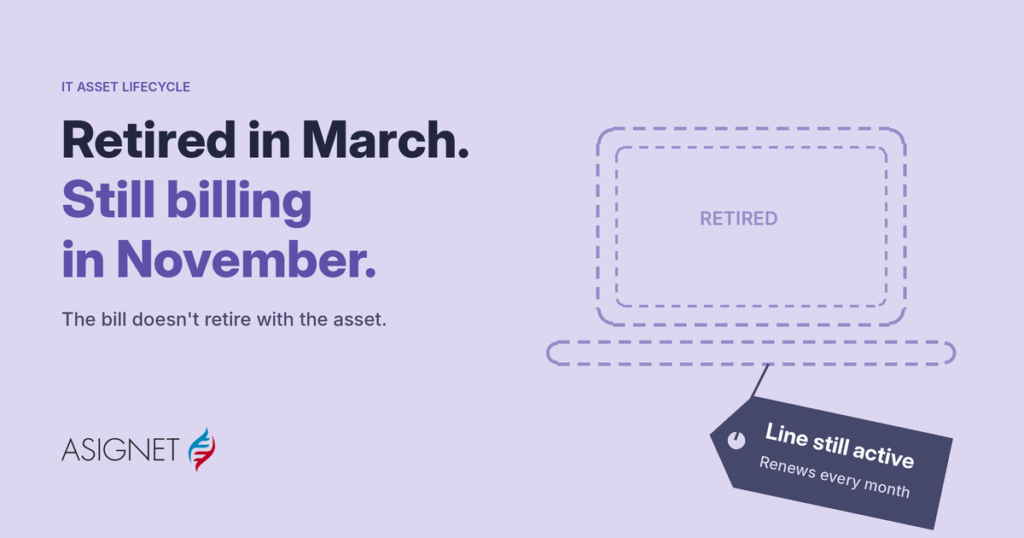
A laptop is returned, but its software licenses keep renewing. A phone goes in a drawer, and its line keeps billing. A server is shut down, and its support contract renews anyway. None of these break anything, which is why they can go on for years.
IT asset lifecycle management best practices
- Keep one inventory. Hardware, software, SaaS, cloud and telecom in one place, with an owner and a cost center for every asset.
- Automate discovery. Inventories that depend on people updating spreadsheets are out of date the day after they’re built.
- Connect the lifecycle to HR events. Joiners get their assets on day one; leavers trigger returns and cancellations the same week.
- Track end-of-support dates. Review critical assets every quarter and keep a refresh calendar that finance can budget for.
- Tie every asset to its contract and invoice. If you can’t say what an asset costs and under which terms, you can’t optimize it.
- Check usage before every renewal. Licenses and subscriptions renew automatically; your decision shouldn’t.
- Close the loop at retirement. Wiping the data is half the job. Cancelling the contracts, lines and licenses is the other half.
How Asignet manages the IT asset lifecycle
Asignet’s Technology Lifecycle service manages every stage, from ordering and provisioning to retirement, across hardware, software, SaaS, cloud and telecom. What makes it different is that it follows the money as closely as the asset:
- One inventory of devices, licenses, lines and cloud resources, each tied to a user and a cost center.
- Every invoice checked against that inventory and your contracts through invoice validation, so retired assets stop billing.
- Licenses matched to real use with SaaS management, so unused seats surface before renewal.
- Lines and plans under control with telecom expense management and cloud expense management.
- Managed services, so the day-to-day work is done for you while your team keeps the decisions.
Start with your retired assets. Take the list of everything retired in the last year and check whether anything is still billing. If you’d like help with the first one, get in touch.
Frequently asked questions
What is IT asset lifecycle management?
IT asset lifecycle management is the practice of tracking and managing every IT asset, from planning and procurement through deployment, maintenance and optimization, to retirement.
What are the stages of the IT asset management life cycle?
Plan, procure, deploy, maintain, optimize and retire. Each stage has its own tasks and its own costs, from the first purchase order to the last cancelled contract.
What are IT asset lifecycle management processes?
The processes that keep each stage moving: request and approval, procurement, inventory and discovery, assignment, patch and support management, license and contract management, invoice validation, refresh planning and disposal.
What is the difference between ITAM and IT asset lifecycle management?
IT asset management (ITAM) is the broader practice of knowing what you have, what it costs and who uses it. Lifecycle management focuses on what each asset needs at each stage, and when.
What happens when an IT asset reaches end of support?
It stops receiving security updates and vendor help. You can pay for extended support where it’s available, replace the asset, or accept the risk. Planning ahead lets you choose instead of reacting.