
Do you want fewer emails in your inbox? Would you like to collaborate more efficiently with your team? If so, Microsoft Teams can be an excellent tool. This article explains what Microsoft Teams does and reviews the pros and cons of using it instead of email for workplace communication.
Microsoft Teams is a collaboration tool that can replace email, such as Outlook, for many purposes. Its chat, file sharing and meeting tools make it a strong alternative for much of your internal communication.
But you’ll still need email for some things. The right balance depends on how often you work with people who don’t use Teams, and on your own preferences. Most people need both Teams and email to get their work done.
Email Isn’t Going Away
Email still has its place. According to The Radicati Group, more than 361 billion emails were sent and received every day in 2024, and that number is expected to grow to more than 424 billion by 2028.
There have been many predictions that Teams will kill email, but that’s unlikely. Email remains the standard for communicating with people outside your organization, for one-to-many communication and for formal records.
One of Teams’ strengths is that it builds on components Microsoft already has. When you schedule a meeting in Teams, it uses your Exchange calendar, so it’s visible in Outlook and any other app connected to your mailbox. The meeting itself then runs in Teams, with video, screen sharing, chat and recording in one place.
Why Use Microsoft Teams Instead of Email?
There are several reasons to use Teams for more of your communication:
- Fewer emails: chat replaces many of the quick back-and-forth messages that fill inboxes.
- Real-time conversations: team members can communicate instantly, without long email chains that are hard to follow.
- Easier file sharing: files are shared and co-edited in Teams, so there’s no need to attach files to emails or search your inbox for the latest version.
- Built-in meetings: participants can join video meetings from a computer or phone, share screens and continue the conversation in chat afterward.
- Microsoft 365 integration: Word, Excel, PowerPoint, SharePoint, OneNote and your calendar are all available from within Teams.
Can I Access My Email Through Teams?
Not directly. Teams doesn’t include an email inbox; you still use Outlook for that. But the two work closely together. You can share an email from Outlook to a Teams chat or channel, and each Teams channel has its own email address, so messages and attachments can be forwarded straight into the conversation where the team will see them.
So, Can Microsoft Teams Replace Outlook?
Not entirely. Microsoft has been changing how we use email for years, but it isn’t retiring Outlook. Microsoft 365 still needs an email client, and for external communication, formal records and organization-wide messages, email remains the better tool.
The Downsides of Teams
- Not everyone uses it. Customers, vendors and partners may not use Teams, and email remains the universal standard.
- Notification overload. Constant chat messages and channel activity can be as distracting as a full inbox if they aren’t managed.
- Information sprawl. Without clear rules for teams and channels, conversations and files end up scattered across too many places.
- It may not suit every company or purpose. Some industries and processes require the formal records and approvals that email provides.
Security isn’t a reason to avoid Teams. Like the rest of Microsoft 365, Teams data is encrypted in transit and at rest, and Teams supports end-to-end encryption for one-on-one calls and, with Teams Premium, for meetings.
Teams and Email, Working Together
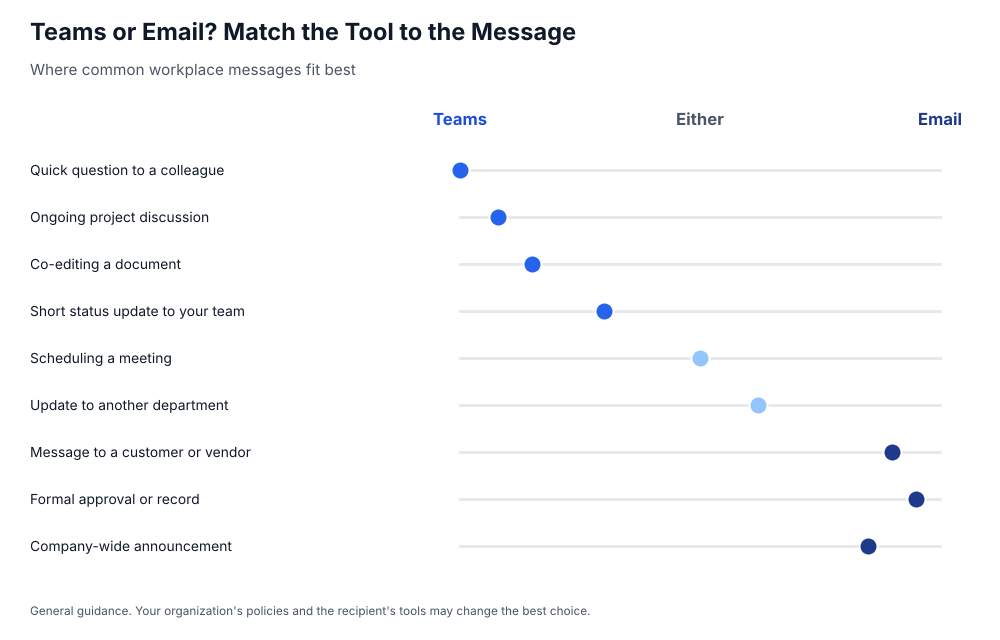
Teams offers many advantages over email for internal collaboration, but Microsoft 365 is a package, not just Teams. Outlook, Word, Excel and the rest of the suite still play their parts, and most organizations will continue using Teams and email side by side.
The key is to use each one for what it does best: Teams for fast, collaborative work with your team, and email for external, formal and organization-wide communication.
Take Control of Your UCaaS Spend With Asignet
As Teams becomes the center of your communications, its licenses, phone numbers and add-ons become a bigger part of your IT budget. Asignet gives you real-time visibility into your unified communications as a service (UCaaS) spend and usage, including users, licenses, extensions and locations, so you can make sure you’re paying only for what your organization uses.
Talk to Asignet about managing your Microsoft Teams and UCaaS costs.