
Many companies don’t realize how much they could save by managing their Microsoft 365 (formerly Office 365) licenses. Most businesses don’t know how many unassigned or inactive licenses they have, or whether they’re paying for higher-tier licenses that users don’t need. The result is higher costs, wasted effort and little visibility into license data.
It’s a common problem across software. According to the Zylo 2026 SaaS Management Index, organizations use only 54% of their SaaS licenses on average. Microsoft 365 is often one of the largest software line items in the budget, so even a small percentage of waste adds up quickly.
Unused licenses go undetected because no one has a clear view of who each license is assigned to and whether it’s still needed. The best way to fix that is a license management solution that uses hyperautomation to monitor, control and report on every user in each business group or tenant, so you pay only for the licenses people actually use.
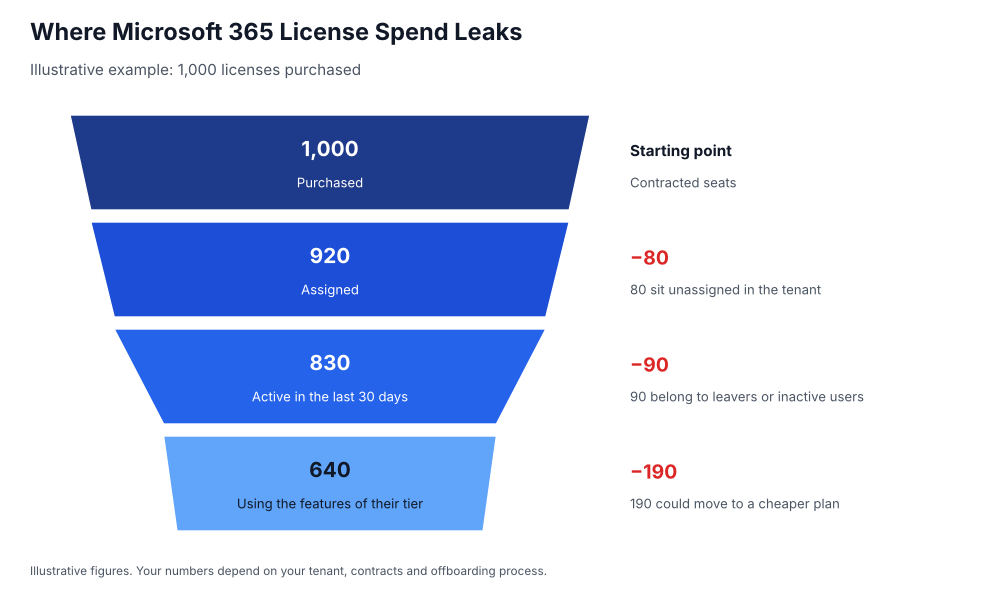
Where Microsoft 365 License Spend Leaks
License waste usually comes from three places:
- Unassigned licenses: seats bought for planned hires or projects that never got assigned to anyone.
- Inactive licenses: licenses still assigned to employees who have left the company or simply stopped signing in.
- Over-licensed users: users on a premium plan, such as E5, who only use features included in a cheaper plan.
One of the biggest mistakes companies make is buying more licenses than they need, then not reclaiming and reassigning them as people come and go.
Why Timing Matters: You Can’t Simply Return Unused Licenses
Microsoft’s licensing terms make over-purchasing expensive. Under Microsoft’s current subscription model, annual subscriptions can only be reduced or canceled within a short window (typically seven days) after purchase or renewal. After that, you’re committed to paying for every seat until the term ends. Monthly-term subscriptions offer more flexibility, but cost more per license.
That means the time to right-size your licenses is before each renewal, and the only way to do that accurately is to know exactly which licenses are assigned, active and needed.
The Benefits of Proper Microsoft 365 License Management
- Lower costs: you stop paying for unassigned and inactive licenses, and you renew only the number of seats you actually need.
- The right license for every user: users get the plan that matches how they work, instead of a premium plan by default.
- Better security: removing licenses and access from former employees closes one of the most common gaps attackers exploit.
- Less IT effort: automating license assignment and reclamation saves IT teams hours of manual work every month.
- Accurate budgeting and chargeback: with clear data on who uses what, you can forecast renewals and charge costs back to the right departments.
How Hyperautomation Helps Control Microsoft 365 License Costs
As companies grow, managing licenses becomes more complex. Many organizations still rely on the Microsoft 365 admin center alone, which shows license assignments but requires manual work to act on them. Hyperautomation fills that gap.
Gain Visibility
How many licenses are unassigned or inactive? Which users are on the wrong plan? With hyperautomation, you always have the answers. The platform consolidates license and usage data and generates custom reports with predefined filters, such as by user, license type or department.
Automate License Management
Managing licenses by hand is time-consuming. Hyperautomation assigns licenses automatically when employees join or change roles and removes them when people leave, so license assignments stay up to date without manual data entry or log checks.
Reduce Costs
The platform automatically identifies licenses that are no longer used and reclaims them, so they can be reassigned to new users instead of buying more. Fewer new purchases means a smaller bill at renewal.
Control Costs
Hyperautomation also helps control spending going forward. Employees can request the licenses they need through an approval workflow, and licenses can be granted for a set period only, so temporary access doesn’t turn into a permanent cost.
Questions to Answer Before Your Next Renewal
Microsoft 365 is a dynamic environment that requires constant monitoring, and that gets harder as your license count grows. To manage licensing proactively, make sure you can answer these questions:
- How many licenses are unassigned or inactive right now?
- Which users are on a higher-tier plan than they need?
- When does each subscription renew, and what is its cancellation window?
- How many licenses are in use, and what do they cost each month?
Asignet uses hyperautomation to give you complete visibility and control over your Microsoft 365 licenses, so you pay only for what your business uses. Talk to Asignet to simplify your license management.