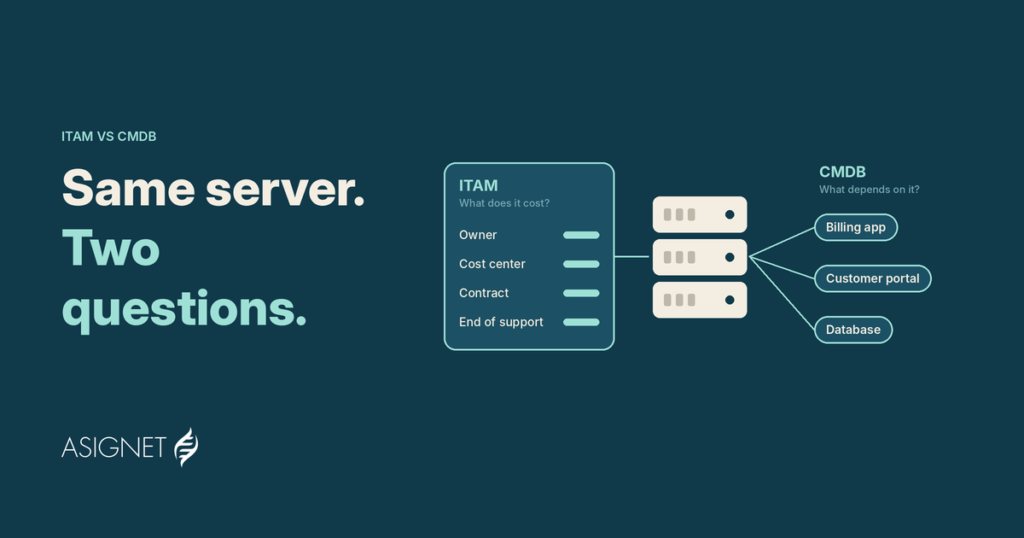
A server goes down at 2 a.m. The operations team opens the CMDB to see which applications depend on it. A week later, finance asks what that same server costs, who owns the contract and when its support ends. That question goes to ITAM.
Same server, two very different questions. That's the simplest way to understand ITAM vs CMDB: they look at the same things, but for different reasons. This article explains what each one is, where they overlap, where they differ and how to use them together.
What is ITAM?
IT asset management (ITAM) is the practice of tracking every IT asset (hardware, software, SaaS, cloud and telecom) across its whole lifecycle, with a focus on cost, ownership, contracts and compliance. It answers questions like: What do we own? Who uses it? What does it cost? When does it renew or reach end of support?
ITAM is mainly a financial and operational discipline. Its users are IT, procurement, finance and accounts payable.
What is a CMDB?
A configuration management database (CMDB) is a repository of the configuration items (CIs) that make up IT services, and the relationships between them: which server runs which application, which application supports which business service, what changed and when.
A CMDB is mainly a technical and operational tool. Its users are IT operations, service management and change management teams, who rely on it to resolve incidents faster and assess the impact of changes.
What ITIL says about the CMDB
ITIL, the most widely used framework for IT service management, defines four core tasks for configuration management:
- Identification: define which configuration items to track, from circuits, routers, switches and wireless access points to the HR and directory data that ties them to people.
- Control: make sure every change goes through an authorized workflow.
- Status accounting: keep the current status of each item up to date.
- Verification and audit: check that the data matches reality, through audits and reporting.
These tasks keep the CMDB reliable. What they don't cover on their own is cost: what each item is billed, under which contract, and whether it's still worth paying for. That's where ITAM comes in.
ITAM vs CMDB: the key differences
| ITAM | CMDB | |
|---|---|---|
| Main question | What do we have, what does it cost, and who owns it? | How is it configured, and what depends on it? |
| Focus | Cost, contracts, lifecycle and compliance | Configuration, relationships and service impact |
| Unit of record | The asset | The configuration item (CI) |
| Scope | Everything with financial value, including assets not yet deployed or already retired | Items that support live IT services |
| Key data | Purchase price, contract, warranty, license, owner, cost center, end of support | Configuration, versions, dependencies, change history |
| Lifecycle covered | From planning and purchase to retirement and disposal | Mostly while the item is in operation |
| Main users | IT asset managers, procurement, finance, AP | IT operations, service desk, change management |
| Typical uses | Budgeting, renewals, license compliance, invoice checks, refresh planning | Incident resolution, change impact, root cause analysis |
Where ITAM and CMDB overlap
The two share more than most teams expect:
- They track many of the same things. A laptop, a server or a software installation can be both an asset and a configuration item.
- They depend on discovery. Both need automated tools that find devices, software and cloud resources, instead of manual spreadsheets.
- They need accurate, current data. Out-of-date records make both useless.
- They support governance. Audits, security reviews and compliance checks draw on both.
Because of that overlap, many companies try to make one do the job of the other. It rarely works.
Why one can't replace the other
A CMDB alone misses the money. It knows that a server runs three applications, but not what the server costs, which contract covers it or that its support ends next quarter. It also doesn't track assets sitting in storage, on order or already retired but still billing.
ITAM alone misses the dependencies. It knows what a server costs and who owns it, but not which business services stop if it goes down. That's what IT operations needs at 2 a.m.
The answer isn't choosing ITAM or CMDB. It's connecting them.
How ITAM and CMDB work together
When both share data, each one gets better:
| ITAM gives the CMDB | The CMDB gives ITAM |
|---|---|
| Ownership, cost center and contract for each item | Which assets are actually in use and by which services |
| Warranty and end-of-support dates for change planning | Configuration changes that may affect licenses |
| Retirement status, so retired items are removed | Dependencies to check before retiring an asset |
A simple example: before retiring a server, ITAM checks the contract, the support date and the cost. The CMDB checks which applications depend on it. Together, they tell you whether it's safe to retire, and how much you'll save.
A connected CMDB for telecom, mobility and cloud
The idea gets more useful when it reaches telecom, mobile and cloud. A connected CMDB links the physical layer (Ethernet, fiber and broadband circuits) to the network devices that run on it (routers, switches, PBXs), and then to the lines, plans and cloud services billed every month.
When that inventory is connected to your financial systems, leadership gets one view of what's deployed, what it supports and what it costs. It also avoids a common trap: buying separate tools for telecom expense management, mobility, ITAM and cloud that don't share data, and then reconciling them by hand.
Best practices for ITAM and CMDB
- Agree on what goes where. Decide which data each system owns, so the same field isn't maintained twice.
- Share one source of discovery. Feed both from the same discovery data so they start from the same picture.
- Use common identifiers. Serial numbers, asset tags or cloud resource IDs let records match automatically.
- Connect ITAM to contracts and invoices. An asset record without cost and contract data can't drive savings.
- Sync retirements. When an asset is retired, update both systems and cancel what was billing for it.
- Review data quality regularly. Check a sample of records every quarter and fix the processes behind the errors.
How Asignet supports ITAM
Asignet focuses on the ITAM side, where assets meet contracts and invoices. Our Technology Lifecycle service keeps one inventory of devices, software, SaaS, cloud and telecom, each tied to a user, a cost center and a contract, from ordering to retirement.
- Invoice Validation checks every bill against that inventory, so retired assets stop billing.
- SaaS Management matches licenses to real use before they renew.
- Telecom and mobile expense management keep lines, plans and devices under control.
- Integrations with your existing systems keep asset data in sync with the rest of your IT tools.
Know what every asset costs
Asignet ties every device, license, line and cloud resource to its owner, contract and invoice, from order to retirement. See Technology Lifecycle.
Frequently asked questions
What is the difference between ITAM and CMDB?
ITAM tracks IT assets across their lifecycle with a focus on cost, ownership, contracts and compliance. A CMDB tracks configuration items and their relationships, with a focus on how IT services are built and what depends on what.
Can a CMDB be used for IT asset management?
Only partly. A CMDB records many of the same items, but usually not their costs, contracts, licenses or assets that aren't in service. Most companies need a dedicated ITAM practice alongside it.
Do I need both ITAM and a CMDB?
Most mid-size and large organizations benefit from both. ITAM supports financial and lifecycle decisions; a CMDB supports incident and change management. They work best when they share data.
What is a configuration item (CI)?
A configuration item is any component that needs to be managed to deliver an IT service, such as a server, an application, a database or a network device, along with its settings and relationships.
Which comes first, ITAM or CMDB?
It depends on the main problem. If costs, renewals and audits are the pain, start with ITAM. If outages and change failures are the pain, start with the CMDB. Either way, plan for the two to share data.