Three-way matching is how accounts payable makes sure the company pays only for what it ordered and actually received. Before an invoice is approved, AP checks it against two other documents: the purchase order and the receiving report.
This guide explains what 3-way matching is, how the process works step by step, how it compares with 2-way and 4-way matching, and how the same logic applies to services like telecom, cloud and software, where the third document is often the contract.
What is 3-way matching?
3-way matching (also called three-way matching or a three-way match) is an accounts payable control that compares three documents before a supplier invoice is paid:
- The purchase order (PO): what the company agreed to buy, and at what price.
- The receiving report: what actually arrived.
- The supplier invoice: what the supplier is asking to be paid.
If items, quantities, prices and terms agree across all three, within any tolerance the company allows, the invoice is approved for payment. If they don’t, the invoice is held as an exception until someone resolves the difference.
The idea is simple: no single document is enough to justify a payment. The invoice says what the supplier wants. The PO proves the company agreed to it, and the receipt proves the company got it.
The three documents in a 3-way match
Each document comes from a different team, which is what makes the match a real control: no one person can create, receive and approve the same purchase.
| Document | Created by | What it proves | What AP checks |
|---|---|---|---|
| Purchase order | Procurement or the requester | The purchase was approved at an agreed price | Item, quantity, unit price, payment terms |
| Receiving report (goods receipt) | Warehouse or whoever received the order | The goods or services were delivered | Quantity received, condition, date |
| Supplier invoice | The supplier | What the supplier is billing | Quantity billed, unit price, taxes, freight, total |
How the 3-way matching process works
The 3-way match runs across procurement, receiving and accounts payable. In most companies it follows six steps:
- Create the purchase order. The requester or procurement issues a PO with the items, quantities, prices and terms, and it’s approved before anything is ordered.
- Record the receipt. When the order arrives, the receiving team logs a receiving report: what came, how much and in what condition.
- Receive the invoice. The supplier sends an invoice that should reference the PO number.
- Match the three documents. AP compares them line by line: item, quantity, unit price, line total, taxes and terms.
- Approve or flag. If everything agrees within tolerance, the invoice is approved. If not, it becomes an exception and goes to the buyer, the receiver or the supplier to resolve.
- Pay and record. The approved invoice is scheduled for payment and posted to the general ledger, with the three documents attached as the audit trail.
Purchase order
What was agreed
Receiving report
What arrived
Supplier invoice
What is billed
AP matches line by line
Within tolerance?
Approve and pay
Posted with all three documents
Exception
Buyer, receiver or supplier resolves it
yes
no
re-match
An exception doesn’t end the process: once the document is corrected, the invoice goes back through the match.
3-way matching example
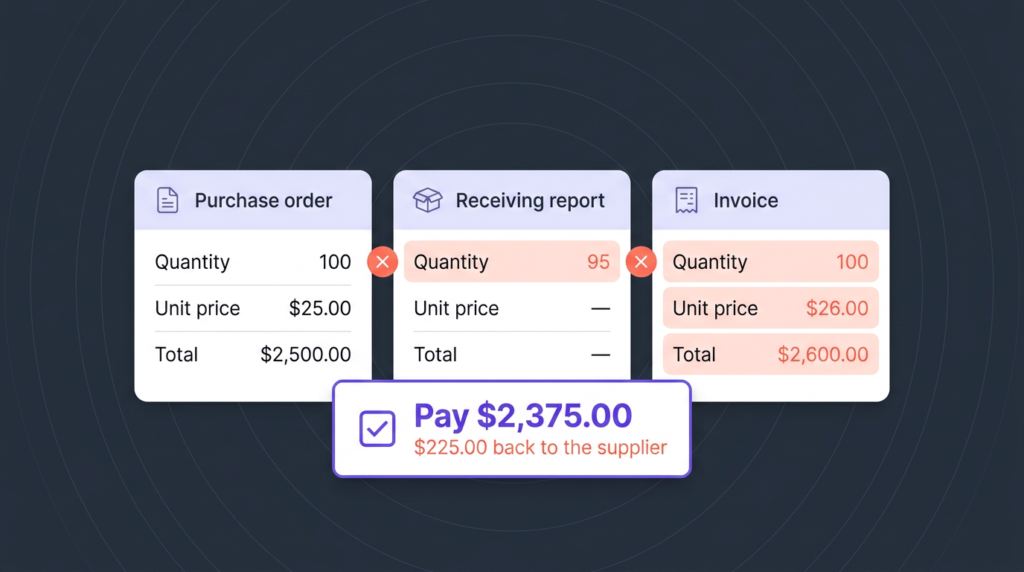
Say a company orders 100 laptop docks at $25 each. Here’s what the three documents show:
| Purchase order | Receiving report | Invoice | |
|---|---|---|---|
| Quantity | 100 | 95 | 100 |
| Unit price | $25.00 | — | $26.00 |
| Total | $2,500 | — | $2,600 |
The match catches two problems. Five units never arrived, and the supplier billed $1 more per unit than the PO allows. Without the match, AP would pay $2,600. With it, the correct amount is 95 units at $25, or $2,375, and the $225 difference goes back to the supplier as a dispute or a request for a corrected invoice.
2-way vs. 3-way vs. 4-way matching
Three-way matching is the middle of three common levels of invoice matching. Each level adds one document and one question.
| Method | Documents compared | Question it answers | Typical use |
|---|---|---|---|
| 2-way matching | PO + invoice | Did we agree to this price and quantity? | Low-value or low-risk purchases, simple recurring services |
| 3-way matching | PO + receiving report + invoice | Did we also receive it? | Physical goods and most supplier spend |
| 4-way matching | PO + receiving report + inspection report + invoice | Did it also pass quality checks? | Quality-critical or regulated items |
Many companies mix them, using 2-way matching below a dollar threshold and 3-way or 4-way matching above it or for higher-risk categories.
Tolerances and exceptions
Not every difference deserves a hold. A tolerance is the gap AP accepts without review, set as a percentage, a fixed amount or both (for example, a price variance of up to 2% or $50, whichever is lower). Tolerances keep rounding differences and small freight changes from blocking payment, while anything larger still gets checked.
What falls outside tolerance becomes an exception. The most common ones are:
- Partial deliveries: the invoice bills the full order, but only part has arrived.
- Price changes: the supplier raised a price that was never updated on the PO.
- Missing PO numbers: AP can’t tell which order the invoice belongs to.
- Charges not on the PO: freight, fees or taxes the PO didn’t include.
- Duplicate invoices: the same invoice sent twice, or resent with a new number.
Each exception needs an owner and an outcome: a corrected invoice, a credit memo, an updated PO or a short payment. The faster that loop closes, the less likely it is that someone approves the invoice just to clear the queue.
3-way matching for services: PO, invoice and contract
Classic 3-way matching was built for physical goods: something is ordered, something arrives, someone counts it. Much of today’s IT spend doesn’t work that way. Telecom, mobile, cloud and SaaS bills arrive every month, change with usage and rarely have a goods receipt behind them.
The control still works, but the three documents change. Instead of a PO and a receiving report, AP matches the invoice against the contract and the usage or inventory data:
| Classic 3-way match | 3-way match for services | What AP checks |
|---|---|---|
| Purchase order | Contract or master agreement | Agreed rates, plans, discounts and credits |
| Receiving report | Usage data or service inventory | What was actually used or active during the period |
| Invoice | Invoice | Each line, quantity, rate and credit billed |
This is a PO, invoice and contract match in practice, with usage standing in for the receipt. It catches the errors that services invoices tend to carry:
- A telecom line billed months after it was disconnected.
- A negotiated cloud discount that never appeared on the bill.
- SaaS licenses billed above the number of seats in the contract.
- A rate increase applied before the contract allows it.
The same logic sits behind validating cloud bills, covered in our cloud cost management guide.
Benefits of 3-way matching
Three-way matching pays for itself by stopping money before it leaves, which is much cheaper than recovering it later.
- No paying for what didn’t arrive. Short shipments and missing services are caught before payment.
- No paying above the agreed price. Price creep is flagged against the PO or contract.
- Fewer duplicate and fraudulent payments. An invoice with no matching PO and receipt doesn’t get paid.
- A clean audit trail. Every payment has the documents that justify it, which internal and external auditors look for.
- More accurate books. Matched invoices post with the right cost center and amount, so accruals and budgets reflect what was really spent.
Why 3-way matching breaks down
The control is simple on paper. In practice, it breaks in predictable places:
- Volume. Matching line by line by hand doesn’t scale past a few hundred invoices a month.
- Messy data. Different units of measure, item descriptions or PO formats turn real matches into false exceptions.
- Late receipts. If receiving doesn’t log the delivery, a correct invoice sits waiting for a document that never comes.
- Services that don’t fit. Usage-based bills have no fixed PO quantity and no goods receipt, so they often skip the match entirely.
- Exception backlogs. When exceptions pile up, the pressure to pay on time wins and invoices get approved on the total alone.
The last two are where most overpayments hide: the invoices that are hardest to match are the ones most likely to be paid without one.
Automating 3-way matching
Automation keeps the control and removes the manual work around it. A well-set-up process:
- Captures invoice data automatically, reading line items from PDFs, portals and electronic invoices instead of retyping them.
- Matches at line level against the PO or contract and the receipt or usage data, not just the invoice total.
- Applies tolerance rules so small, expected differences pass and real ones don’t.
- Routes exceptions with evidence, sending each mismatch to the right owner with the documents that show the difference.
- Feeds the ERP and the general ledger with approved, coded invoices.
For more on how AP teams get there, see Invoice Processing Best Practices and From Paper to AI: How Automation Is Rewriting Accounts Payable.
How Asignet approaches invoice matching
Asignet’s invoice validation applies the 3-way match to the bills that rarely get one: telecom, mobile, cloud, SaaS and other IT services. Each invoice is checked line by line against your contracts and your inventory of active services and usage before it’s paid.
- Contract checks: rates, plans, discounts and credits are compared with what you agreed.
- Inventory and usage checks: charges for disconnected lines, unused licenses or idle services are flagged.
- Dispute management: errors go back to the provider with evidence, and Asignet tracks them until they’re resolved.
- AP automation: validated invoices reach approval and payment already coded to the right cost center.
Start with one bill. Take your largest telecom or cloud invoice and match it against your contract and your active services. If you’d like help with the first one, talk to Asignet.