What is hyperautomation?
Hyperautomation is the practice of automating as many business and IT processes as possible, end to end, by combining several technologies, such as workflow, RPA, AI, machine learning and low-code tools, instead of relying on any one of them alone.
The idea is simple. A single tool can automate a single task: a robot copies data from a portal, a rule routes an approval, a model reads a document. Hyperautomation connects those pieces so a whole process runs on its own, from the moment something arrives to the moment it’s done, with people stepping in only for the exceptions.
Gartner coined the term in 2019 to describe the move beyond RPA alone toward a combination of complementary tools. It has since become one of the main ways companies talk about automation at scale, and Gartner projects the market for hyperautomation technology, including RPA, low-code, AI and virtual assistants, to reach $119.2 billion by 2028 (Gartner).
Hyperautomation vs. automation
The difference is scope. Traditional automation asks: which task can we automate? Hyperautomation asks: which process can we run end to end, and which tools does it take?
| Task automation | Hyperautomation | |
|---|---|---|
| Scope | One task or step | A whole process, end to end |
| Tools | Usually one (a script, a robot, a rule) | Several, working together |
| People | Hand work off between automated steps | Handle only the exceptions |
| Goal | Save time on a step | Change how the process runs |
How hyperautomation works
Hyperautomation isn’t one product. It’s a set of building blocks, each good at one kind of work:
- RPA (robotic process automation): software robots that work in portals and systems the way a person would, where there’s no integration.
- Document readers: tools that turn PDFs, scans and emails into structured data.
- Business rules: the checks that decide what’s right, like price against contract or quantity against receipt.
- Workflows: what moves work from step to step and routes exceptions to the right person.
- AI and machine learning: for the messy parts, like new layouts, inconsistent product names and spotting unusual patterns.
- Low-code platforms: to build and change processes in days instead of months.
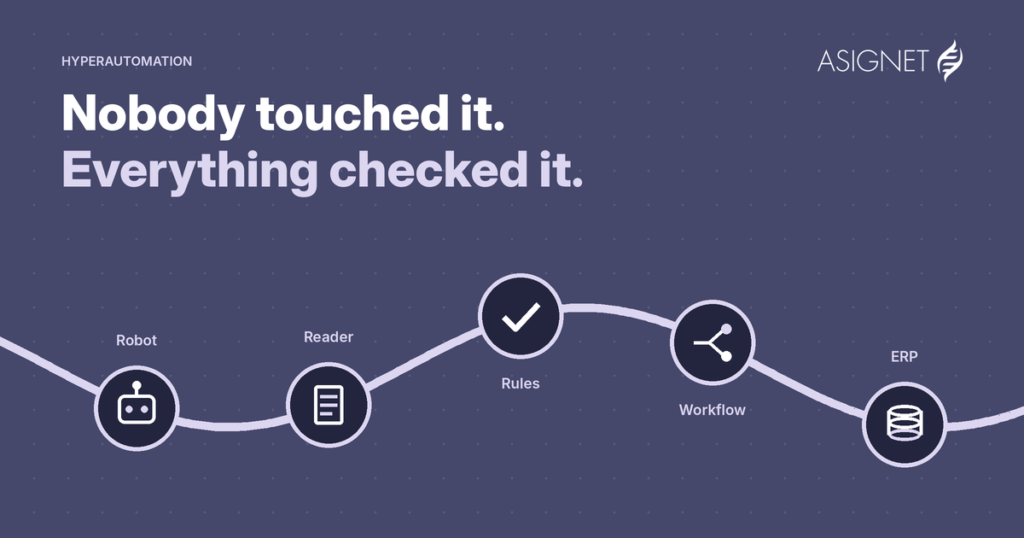
The value comes from using them together, on one process:
One process, end to end, with a different tool on each step
Example: a supplier invoice, from portal to payment
- 1Invoice sits in a portalRPA robot
- 2Every line is readDoc reader
- 3Matched to PO and receiptRules
- 4Exception goes to its ownerWorkflow
- 5Approved, sent to the ERPIntegration
AI sits across the steps: it builds readers for new layouts and helps match products named differently.
In 2026 the conversation is also moving toward AI agents, which can take routine decisions and escalate the rest. They fit the same picture: one more building block, most useful when the rules, the data and the audit trail around them are solid.
Benefits of hyperautomation
The benefits of hyperautomation come from running whole processes, not just faster steps:
- Lower operating costs. Routine work like data entry, portal downloads and status chasing moves to software, so teams grow slower than volume.
- Fewer errors and overpayments. When every invoice line, charge or record is checked by the same rules, mistakes that slip through manual reviews get caught.
- Faster cycle times. Processes that waited on emails and handoffs run in hours instead of days.
- Better compliance and audit trails. Every step is logged, so you can show who did what, when and why, without rebuilding it from inboxes.
- More visibility. When the process runs on one platform, you can see where work is stuck and where money goes, in real time.
- People on better work. Teams spend their time on exceptions, suppliers and decisions, not on copying data between systems.
The biggest benefit is often the least visible: processes that never get checked by hand, because there’s too much volume, finally get checked every time.
Hyperautomation in practice
At Asignet, hyperautomation is how we control technology and business spend. A few examples:
| Process | What hyperautomation does |
|---|---|
| Telecom expense management | Robots pull carrier invoices, every line is checked against inventory and contract, and disputes are opened automatically |
| Mobile expense management | Devices and lines are tracked across carriers, and billing anomalies are flagged before payment |
| Cloud expense management | Cloud invoices are validated against usage and contracts, and costs are allocated to cost centers |
| SaaS management | Licenses are matched to real use, so unused seats surface before renewal |
| Invoice validation | Supplier invoices are matched to POs and receipts, line by line, and only exceptions reach a person |
Where to start
Hyperautomation sounds big, but it starts small:
- Pick one process with volume and pain, like supplier invoices, carrier bills or employee onboarding.
- Map it step by step, including the emails, spreadsheets and portals nobody likes to talk about.
- Measure today’s baseline: time, cost, errors and how much is actually checked.
- Automate it end to end, not step by step, and keep people on the exceptions.
- Expand on the same platform to the next process, reusing what you built.
Asignet’s Wayfast platform was built for this: one place where robots, document readers, rules and workflows work together, configured for each process instead of coded from scratch. Get in touch and we’ll help you pick the first process.
Frequently asked questions
What is hyperautomation?
Hyperautomation is the practice of automating as many business and IT processes as possible, end to end, by combining technologies such as workflow, RPA, AI, machine learning and low-code tools.
What is the difference between hyperautomation and RPA?
RPA automates individual tasks by mimicking clicks and keystrokes. Hyperautomation uses RPA as one tool among several to run whole processes end to end.
What are the benefits of hyperautomation?
Lower operating costs, fewer errors and overpayments, faster cycle times, better compliance and audit trails, more visibility and more time for people to work on exceptions and decisions.
Does hyperautomation replace people?
No. It removes routine work so people can focus on the exceptions, decisions and relationships that software can’t handle.