How much bandwidth are the devices and locations on your network using, and is it in line with what you’re paying for? Two sources of data can answer those questions: SNMP and CDRs.
- SNMP (Simple Network Management Protocol) is the standard way to collect performance data from routers, switches, firewalls and other network devices, including how much traffic passes through each interface.
- CDRs (call detail records) are records of every phone call, including who called whom, when, for how long and, for VoIP calls, quality metrics such as jitter, latency and packet loss.
Together, they show how your network and voice services are actually used, which is the key to both better performance and lower costs.
From Reactive to Proactive Network Management
Bandwidth-heavy applications can slow down your entire network, and in many organizations, it takes an outage or a flood of user complaints to alert IT to a problem. At that point, the team is forced to be reactive rather than proactive.
When you always have your finger on the pulse of the network, you can spot and fix issues faster because you know where to look. That’s where network bandwidth monitoring comes in.
What Network Bandwidth Monitoring Lets You Do
Identify Bandwidth Needs
It’s best to calculate your bandwidth requirements up front to avoid major overhauls later. That means understanding the bandwidth needs of both your local area network (LAN) and your wide area network (WAN).
A network monitoring tool tracks LAN and WAN usage, so you know how much capacity your network really needs and when it may be time to upgrade, such as when you open a new location, add employees or move more applications to the cloud. With ongoing monitoring, you can spot trends that signal a need for more bandwidth well in advance. Planning an upgrade should never be the result of a crisis.
Boost Network Performance
The solutions to bandwidth complaints are often obvious once you know where to look. Bandwidth monitoring gives you a complete picture of network health, so you can:
- See which applications use the most bandwidth, and how
- Spot bottlenecks at a glance
- Analyze traffic patterns over time
- Track the response time, availability and uptime of routers, switches and other SNMP-enabled devices
That lets you catch emerging problems and find the root cause of performance issues before users complain and productivity grinds to a halt.
Bandwidth utilization is calculated from SNMP data by polling each interface’s traffic counters at two points in time and comparing the difference against the interface’s capacity. Doing that manually across hundreds of interfaces and locations is time-consuming. Asignet automates the process with its platform, using robotic process automation (RPA) and artificial intelligence (AI).
Enhance Security
Attackers are constantly looking for opportunities to inject malware and steal sensitive data. Monitoring bandwidth usage helps you identify suspicious activity, such as unusual traffic flows or unexpected spikes from a single host, so you can investigate and respond before a breach occurs.
Protect Your Budget
Adding bandwidth is sometimes necessary, but it’s expensive. Monitoring also helps you answer a question many companies never ask: are you getting what you pay for?
Are You Paying for Bandwidth You Don’t Use?
Many companies don’t know how much bandwidth they actually use or how much they spend on it each year. Circuits are often ordered with plenty of headroom and then renewed at the same size for years, even as usage changes.
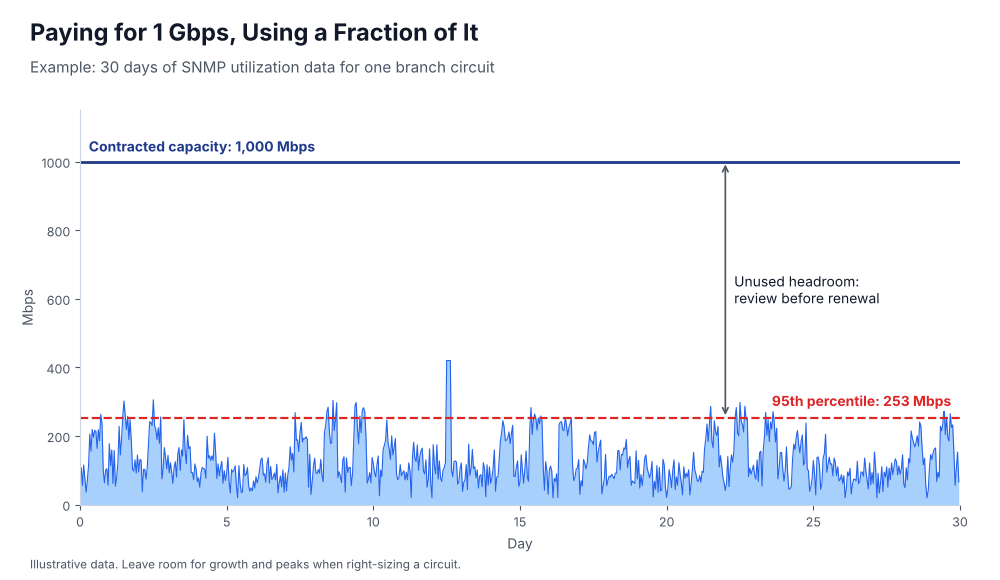
This is where combining monitoring data with billing data pays off. Asignet’s wireline telecom expense management (TEM) connects SNMP utilization data to the circuits and services on your invoices, down to each component of your voice and data network. That ensures the services you pay for are working, correctly configured and sized to match actual usage, so you can right-size circuits and avoid overspending.
Using CDRs to Improve Voice Quality and Control Costs
CDR integration provides the information needed to analyze VoIP calls, including their quality metrics. By analyzing CDRs, you can monitor call performance and proactively identify and eliminate problems such as jitter, latency and noise.
Asignet’s platform monitors call performance metrics for every location in the CDRs of all VoIP calls, so you can make sure voice quality stays on track. You can report on CDRs to find low-quality calls, identify patterns and see whether other calls are affected.
CDRs also support cost control. They show call volumes, destinations and durations by location and user, which helps you choose the right calling plans, spot unusual or unauthorized calling, and allocate costs accurately.
Combining real-time SNMP monitoring with CDR analysis helps companies resolve VoIP performance problems quickly, assure the quality of every call and make sure every network and voice service is worth what it costs.
Talk to Asignet to see the big picture of your network performance and costs.