Microsoft 365 E5 is Microsoft’s most complete enterprise plan, and Microsoft often encourages E3 customers to upgrade. For some users, E5 is worth every dollar. For many others, it means paying for advanced security, compliance and analytics tools they will never use.
The stakes went up in 2026. On July 1, Microsoft raised prices across its enterprise suites, so the gap between plans matters more at every renewal. Here’s what E5 actually adds, what it costs and how to decide which users really need it.
Microsoft 365 E5 vs. Office 365 E5
Microsoft sells two families of enterprise plans, and the names are easy to confuse:
- Office 365 E3 and E5 include the Microsoft 365 apps (Word, Excel, PowerPoint, Outlook and others) plus cloud services such as Exchange, SharePoint, OneDrive and Teams.
- Microsoft 365 E3 and E5 include everything in the matching Office 365 plan, plus Windows Enterprise, device management with Microsoft Intune and identity and security services from Microsoft Entra and Defender.
Most enterprises compare Microsoft 365 E3 and E5, so that’s the focus of this article. Microsoft 365 Business plans are an alternative for smaller organizations, but they are capped at 300 users.
What E3 and E5 Cost in 2026
These are US list prices per user per month with an annual commitment, effective July 1, 2026. Existing customers move to the new prices at their next renewal.
| Plan | With Teams | Without Teams |
|---|---|---|
| Office 365 E3 | $26.00 | $17.45 |
| Office 365 E5 | $41.00 | $32.45 |
| Microsoft 365 E3 | $39.00 | $30.45 |
| Microsoft 365 E5 | $60.00 | $51.45 |
Source: Directions on Microsoft. Actual prices vary by country, agreement type and negotiated discounts.
Upgrading from Microsoft 365 E3 to E5 adds $21 per user per month, or $252 per user per year. For 1,000 users, that’s more than $250,000 a year, which is why the decision deserves a closer look than a blanket upgrade.
What E5 Adds Over E3
Both plans include the same productivity apps, Teams (in the “with Teams” versions), Intune and Copilot Chat. As of 2026, E3 also includes Defender for Office 365 Plan 1 and more Intune capabilities than before. E5 adds four main groups of features.
Advanced Security
- Microsoft Defender XDR: the full Defender suite, including Defender for Endpoint Plan 2, Defender for Office 365 Plan 2, Defender for Identity and Defender for Cloud Apps (formerly Cloud App Security), with automated investigation and response across email, devices, identities and cloud apps.
- Microsoft Entra ID P2: risk-based conditional access, identity protection and privileged identity management.
- Security Copilot: AI-assisted security investigation, which Microsoft is rolling out to E5 customers.
Advanced Compliance
- Microsoft Purview eDiscovery (Premium): formerly Advanced eDiscovery, it supports the full workflow of preserving, collecting, analyzing, reviewing and exporting content for legal cases and internal investigations, including legal hold notifications.
- Insider risk management and communication compliance: tools that help detect data leaks and policy violations.
- Audit (Premium) and automatic data classification: longer audit log retention and automatic sensitivity labeling.
Voice
E5 includes Teams Phone, which turns Teams into a full business phone system. With a calling plan or your own carrier, users can make and receive calls to regular phone numbers.
Analytics
E5 includes Power BI Pro, which lets users publish and share interactive reports and dashboards.
When Upgrading to E5 Makes Sense
E5 is usually worth it in two situations:
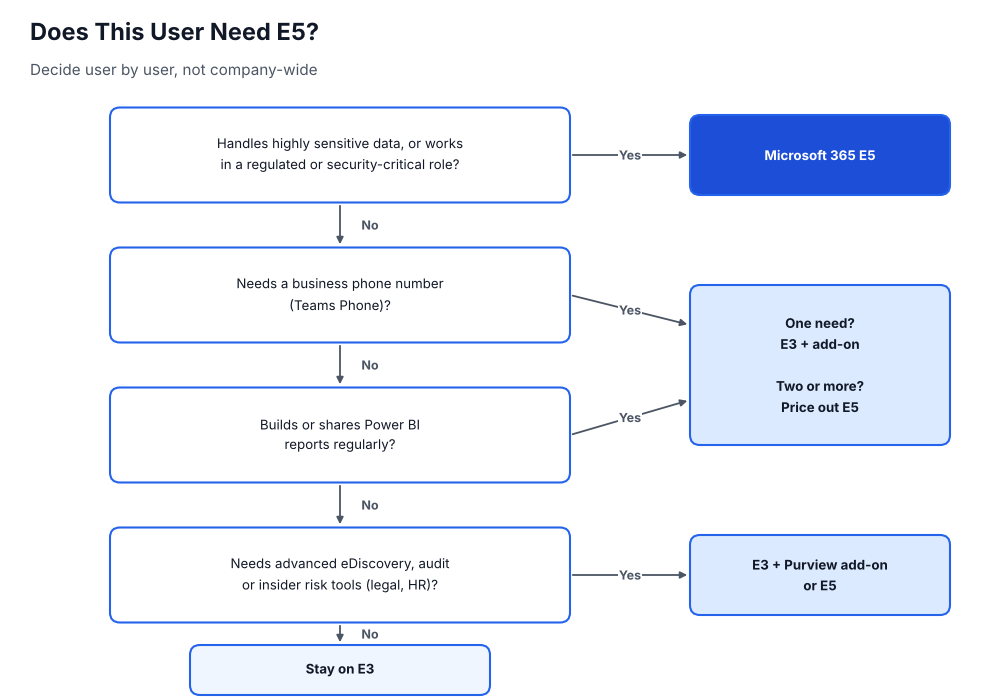
- You need the advanced security and compliance tools. Organizations in regulated industries, or those replacing third-party security tools with Microsoft Defender, often find E5 cheaper than buying and integrating separate products.
- Users need several E5 features. Teams Phone and Power BI Pro are also sold separately, for about $10 and $14 per user per month respectively. A user who needs both already costs more on E3 plus add-ons than the $21 difference to E5, before counting any security or compliance features.
When It Doesn’t
For users who only need one E5 feature, an add-on to E3 is usually cheaper. Microsoft sells E5 Security, E5 Compliance, Teams Phone and Power BI Pro as add-ons, so you can give each user exactly what they need.
You also don’t have to choose one plan for everyone. Most organizations can mix licenses: E5 for security teams, executives, legal and others who handle sensitive data, and E3 for everyone else. Frontline workers may only need an F-series plan.
What About Copilot?
Neither E3 nor E5 includes full Microsoft 365 Copilot. Both now include Copilot Chat in Word, Excel, PowerPoint, Outlook and OneNote, but Microsoft 365 Copilot itself is a separate add-on at $30 per user per month. Budget for it separately, and assign it only to the users who will use it.
Get the Right License for Every User
The most expensive Microsoft licensing mistake isn’t choosing the wrong plan. It’s paying for the wrong plan for the wrong users, and paying for licenses no one uses at all. Before your next renewal, review which users actually use E5 features, which ones could move to E3 or an add-on, and which licenses belong to people who have left.
Asignet’s IT asset management and SaaS management solutions give you visibility into Microsoft 365 license assignment and usage, so you can right-size every license and avoid overpaying at renewal. Talk to Asignet about optimizing your Microsoft 365 licensing.